
125 lines
3.8 KiB
Markdown
125 lines
3.8 KiB
Markdown
# No-Internet Group
|
|
|
|
## Description
|
|
Simple minimalistic methodology to prevent specified Linux programs having access to the public Internet via iptables
|
|
|
|
## Workflow
|
|
|
|
```
|
|
System applies no-internet iptables rule at boot
|
|
↓
|
|
User executes program
|
|
↓
|
|
Program is launched via sg with the group "no-internet"
|
|
↓
|
|
Newly created process inherits no-internet GID
|
|
↓
|
|
iptables matches packets from processes with the no-internet GID
|
|
↓
|
|
Outbound packets belonging to the program dropped
|
|
```
|
|
|
|
## Getting Started
|
|
|
|
### Dependencies
|
|
- iptables
|
|
|
|
- systemd or cron
|
|
|
|
- sg
|
|
|
|
### Creating the Group
|
|
First we will create the controlled access group through which programs will be denied public network access
|
|
```
|
|
groupadd no-internet
|
|
```
|
|
And add your user to it
|
|
```
|
|
usermod -a -G no-internet $(whoami)
|
|
```
|
|
You should now see no-internet as a group your user is a member of
|
|
|
|
To check run
|
|
```
|
|
groups $(whoami)
|
|
````
|
|
Your user will need to be a member of the group as we will run the programs through sg
|
|
|
|
### Creating the Systemd Service
|
|
Next we will create a systemd service which uses iptables to drop outbound connections made by the "no-internet" group
|
|
```
|
|
touch /etc/systemd/system/no-internet.service
|
|
nano /etc/systemd/system/no-internet.service
|
|
```
|
|
Enter the following within the service file then write and quit
|
|
```
|
|
[Unit]
|
|
Description=Drops outbound Internet traffic for the group "no-internet"
|
|
|
|
[Service]
|
|
ExecStart=iptables -I OUTPUT -m owner --gid-owner "no-internet" -j DROP
|
|
Type=oneshot
|
|
|
|
[Install]
|
|
WantedBy=multi-user.target
|
|
```
|
|
|
|
Breakdown of iptables command:
|
|
|
|
- iptables is an administration tool for IPv4/IPv6 packet filtering
|
|
|
|
- the -I OUTPUT flag specifies the rule is responsible for packets leaving the host
|
|
|
|
- the -m owner flag allows packet filtering based upon the owner of the process
|
|
|
|
- the --gid-owner "no-internet" flag specifies for the rule to match processes created by the group 'no-internet'
|
|
|
|
- the -j DROP flag specifies the action to take, in this case dropping the packets
|
|
|
|
Next we will reload our systemctl services, and enable no-internet so it persistently starts at boot
|
|
```
|
|
systemctl daemon-reload
|
|
systemctl enable --now no-internet.service
|
|
```
|
|
|
|
Note: a similar effect could be achieved via cron by making an entry along the lines of
|
|
```
|
|
@reboot root iptables -I OUTPUT 1 -m owner --gid-owner "no-internet" -j DROP
|
|
```
|
|
### Modifying .desktop entries
|
|
|
|
.desktop files are used within graphical Linux shells to launch programs
|
|
|
|
Simply put when a program is ran through an application launcher the .desktop file is what is what is being read from and executed in the background
|
|
|
|
They are typically located within ~/.local/share/applications
|
|
|
|
An example of a program which I want to deny network access to due to its persistent and bothersome connections is Lutris
|
|
|
|
Before modification it's Exec value will likely look something like
|
|
```
|
|
Exec=/usr/bin/lutris
|
|
```
|
|
However we are going to modify this so it runs under the group "no-internet" any time it is launched, thereby having outbound connections dropped
|
|
|
|
This may be achieved by changing the line like so:
|
|
```
|
|
Exec=/usr/bin/sg no-internet -c /usr/bin/lutris
|
|
```
|
|
Note: your binaries may be located in a different place, type "which [program_name]" or "type [program_name]" into the terminal to find their path
|
|
|
|
Now any time lutris is launched from my desktop it will be ran through the "no-internet" group
|
|
|
|
### Usage Examples
|
|
|
|
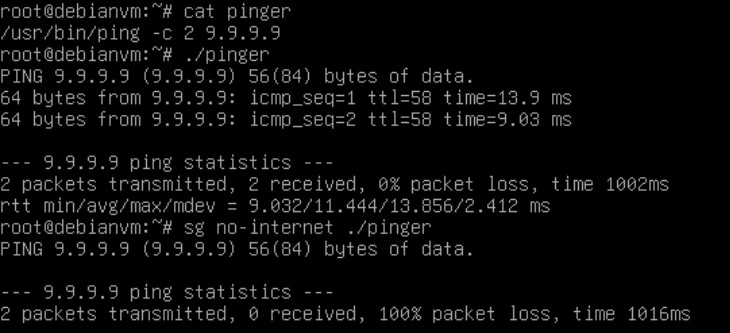
CLI example:
|
|
|
|
|
|
|
|
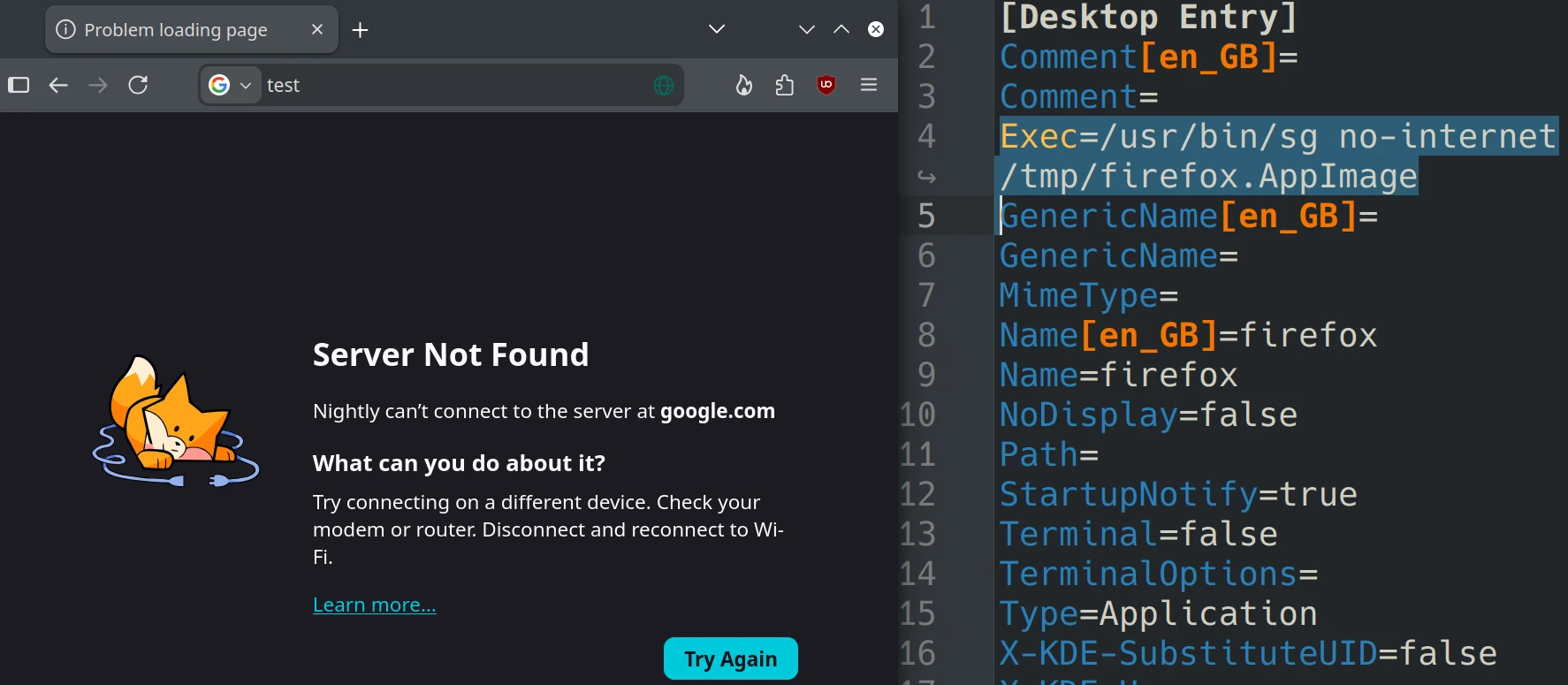
Desktop example:
|
|
|
|
|
|
|
|
### Limitations
|
|
As iptables is operating at layer 3 programs ran through this sandboxed group will still be able to reach devices within the same broadcast domain
|